LED

24/7 Support
24/7 Support

We are always by your side whenever you need us. With our professional support team, we provide fast solutions.

Reliable Service
Reliable Service

With our customer satisfaction-oriented approach, we have succeeded in being a trusted brand in the industry for many years.

Professional Solutions

With our experienced team, we provide innovative and professional solutions tailored to the needs of your business.

Award-Winning Achievements

With our innovative projects and the values we have added to the industry, we have been honored with numerous awards.
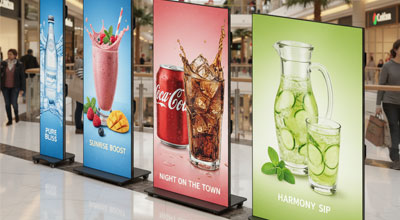
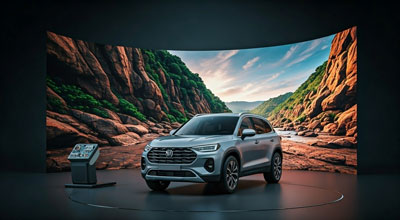
Effective Visual Communication with LED Display Technology

What is an LED Display?

An LED display is an advanced display technology that enables images and videos to be presented digitally with high brightness and clarity. Made up of light-emitting diodes (LEDs), these systems provide a powerful visual solution for both indoor and outdoor applications. LED displays and LED signage solutions are widely used today in many areas, from advertising to corporate communication.

Advantages of LED Display Systems

LED displays enable messages to be communicated effectively thanks to their high resolution and wide viewing angles. Their ability to provide clear visibility even under sunlight offers a major advantage, particularly for outdoor applications. Long service life, low maintenance requirements and energy efficiency make LED display systems more advantageous than traditional display solutions.

Indoor and Outdoor LED Display Solutions

Indoor LED displays are frequently used in shopping malls, retail stores, exhibition areas and corporate offices. Their high pixel density provides clear images even at close viewing distances. Outdoor LED displays are ideal for building façades, public squares and outdoor advertising thanks to their weather-resistant structure. Their high brightness levels ensure visibility throughout the day. Indoor and outdoor LED signage systems also enable scalable digital communication solutions for different environments and applications.

LED Display Applications

LED display technology is used in a wide range of applications, including advertising and promotion, information boards, event stages, sports venues and digital storefronts. LED signage applications enable brands to deliver timely and effective messages to their target audiences through dynamic content management.

The Role of LED Displays in Digital Transformation

In an increasingly digital world, LED displays have become a strategic communication tool for improving brand visibility. Flexible content management, strong visual impact and a modern appearance help businesses strengthen their digital communication. LED display and LED signage solutions are among the technologies shaping the future of visual communication. Contact us to learn more about Unisign LED display solutions and request a quotation.

What is Pixel Pitch? Technical Criteria for Choosing an LED Display

Pixel pitch refers to the distance between two light points on an LED display and directly affects image quality. For indoor displays, a pixel pitch between P1.5 and P4 is generally preferred, while P6–P10 may be suitable for outdoor applications. The shorter the viewing distance, the lower the pixel pitch should be, resulting in higher image resolution.

For outdoor LED displays, an IP65 or higher protection rating and brightness levels of 5,000 nits or above are also among the key technical criteria. Unisign offers different LED display solutions for both indoor and outdoor applications.

Contact us today for detailed technical information and a customized quote for your LED screen project.
 

LED Frequently Asked Questions
    • Consider pixel pitch alongside the closest viewing position and the intended content. Small text and close viewing may require more image detail. Screen size alone is not enough to determine the appropriate pitch. Include the physical width and height in the comparison; the same diagonal can correspond to different layouts. Total pixel resolution matters for small text and detailed graphics. For large artwork viewed from farther away, consider the content layout and display position together. Plan the selected modules or cabinets, control system and content source as one installation. Compare the listed specifications consistently and distinguish between the operating conditions of indoor and outdoor models.
    • Share the model, quantity and installation location. Specify mounting, content playback or management software and any accessories separately so the hardware and service scope can be compared for your requirements. Consider the available installation space as well as the screen diagonal. A quotation request can include the intended task, daily operating hours, indoor or outdoor location and delivery destination. For multiple sites, list quantities and differing requirements separately so that model options can be compared. Identify any required connection or function that is not shown in the specification. This helps define a comparable equipment proposal rather than a screen price without the installation context.
    • Prepare content for the selected display’s actual pixel resolution to avoid unnecessary scaling of text and logos. Two LED displays of the same physical size can have different pixel pitches. Preserve the aspect ratio rather than stretching artwork, and check small text from both near and distant viewing positions. Controller and content-source output settings must also match the display.
    • Assess the mounting surface and available clearance for the selected cabinet or module’s service arrangement. Power, data cables and ventilation belong in the installation plan. Verify front or rear service access from the model information rather than assuming every LED product uses the same arrangement. Share site photographs, target dimensions and access conditions when requesting a quotation.
    • Physical size alone is not enough. Compare pixel pitch, total resolution, brightness, operating environment and the control system on the same basis. Ask for modules or cabinets, support structure, power and data connections, and installation to be identified separately. Specify the content source and software requirements so quoted prices can be compared against the same equipment and service scope.
    • Options listed in this category include Plug & Play Series, Modular LED Panels. Start with the installation location and the task, then narrow the shortlist accordingly. Open each model page to check the complete product code and that model’s technical values. Listing images do not establish that all sizes or equipment options are identical. Record physical dimensions, connections, mounting format and stated operating conditions in a consistent order when comparing products. If the new equipment will be used with an existing system, provide those model details too. Share your preferred products and quantities so the options can be reviewed together; identifying additional equipment and installation requirements helps define the appropriate scope.